

Schema Markup Generator: The Complete Guide to Creating and Validating JSON-LD Structured Data
A schema markup generator is a tool that creates structured data code, usually in JSON-LD format, without requiring you to write it by hand. You fill in fields like name, price, or review rating, and the tool outputs code ready to paste into your website. This code helps search engines like Google understand your content and can make it eligible for rich results such as star ratings, FAQ dropdowns, or product details in the search results. Tool Hub Zone provides practical online tools that simplify technical SEO tasks like generating structured data, allowing website owners and marketers to create useful markup without dealing with complex code manually.
Search engines read your page’s words, but they don’t automatically know that a number is a price, a date is a publish date, or five stars mean a rating. Schema markup fills that gap. A schema markup generator makes the process faster by handling the code structure for you, so you can focus on entering accurate information instead of learning JSON-LD syntax from scratch. For users working through Tool Hub Zone, this approach makes schema creation more accessible while keeping the focus on accurate, search-friendly structured data.
This guide covers what schema markup is, how a generator works, which schema type fits your page, and how to validate the code once it’s live.
What Is Schema Markup?
Schema markup is a standardized code format that describes the content on a webpage in a way search engines can read directly. It comes from Schema.org, a shared vocabulary maintained jointly by Google, Microsoft, Yahoo, and Yandex.
There are three common ways to write schema: JSON-LD, Microdata, and RDFa. JSON-LD is the format Google recommends and the one most generators produce by default, since it sits in a separate script block rather than being woven into your HTML tags. That separation makes it easier to add, edit, or remove without touching the rest of your page.
What Is a Schema Markup Generator?
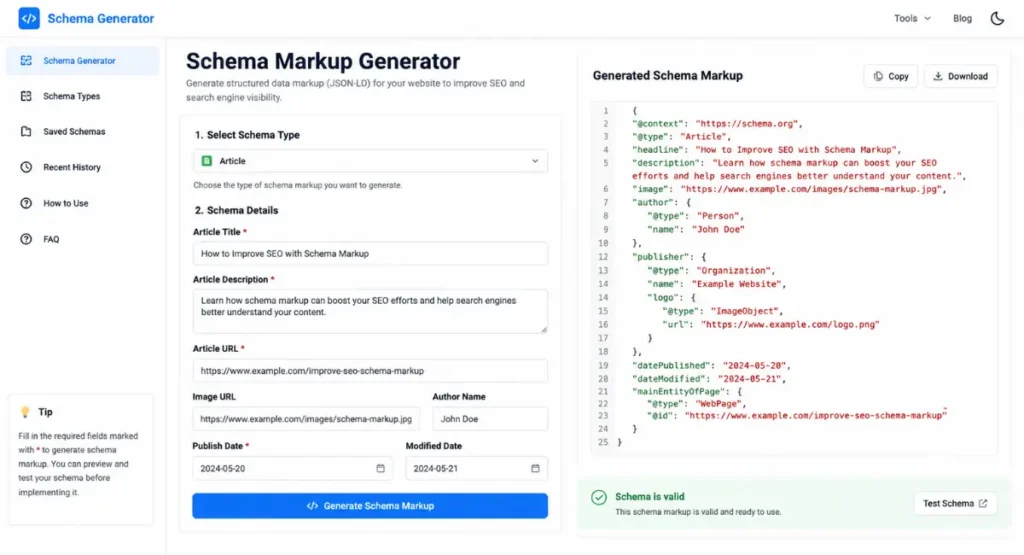
A schema markup generator is a tool that builds valid structured data code from a form-based interface instead of requiring manual coding. You select a schema type, such as Article, Product, or FAQPage, fill in the relevant fields, and the tool outputs JSON-LD you can copy into your page.
Writing schema by hand is possible, but it’s easy to miss a required property or make a syntax error that breaks the whole block. A generator reduces that risk by prompting you for the fields Google actually looks for, though it doesn’t replace the final validation step, which we’ll cover further down.
Why Schema Markup Matters for SEO
Schema markup doesn’t directly change your ranking position, but it can influence how your page appears in search results. Pages with valid, relevant schema become eligible for rich results, meaning things like star ratings under a review, an FAQ dropdown under a blog post, or a price and availability under a product listing.
Whether a rich result actually appears depends on Google’s own systems, page quality, and content relevance, so schema markup is best treated as an eligibility requirement rather than a guarantee. It can also help pages surface in AI-generated answers and voice search results, since structured, unambiguous data is easier for language models to extract and cite accurately.
How Does a Schema Markup Generator Work?
Most schema markup generators follow the same basic process, regardless of which tool you use. You start by choosing a schema type from a list, since each type (Article, Product, LocalBusiness, and so on) has its own required and optional properties.
The tool then presents a form matching that schema type’s fields. As you fill them in, the generator assembles the values into a JSON-LD script block behind the scenes. Once you’re done, you copy the generated code and paste it into your page, typically inside the section or directly before the closing tag, depending on your CMS.
How to Generate Schema Markup: Step-by-Step
Generating schema markup is a five-step process from start to finish. Here’s how it breaks down.
Step 1: Choose Your Schema Type
Decide what kind of content the page represents. A blog post uses Article schema, a product page uses Product schema, and a page answering common questions uses FAQPage schema. Using the wrong type, or stacking multiple unrelated types on one page, can confuse search engines rather than help them.
Step 2: Fill In the Required Fields
Every schema type has a set of required properties. Article schema, for example, typically needs a headline, author, publish date, and image. Skipping required fields is the most common reason schema fails validation later.
Step 3: Generate the JSON-LD Code
Once the form is complete, the generator compiles your entries into a JSON-LD script block. At this stage, most tools let you copy the code directly or download it as a file.
Step 4: Add the Code to Your Website
Paste the generated script into your page’s HTML. On WordPress, this usually means using a custom fields plugin, a theme’s header/footer script section, or a dedicated schema plugin, rather than editing the theme files directly.
Step 5: Validate and Test the Markup
Generating the code isn’t the last step. You still need to confirm it’s error-free and eligible for rich results, which we cover in detail later in this guide.
Which Type of Schema Markup Should You Use?
The right schema type depends entirely on what the page is about. Using an accurate, page-matching schema type is more important than using as many types as possible.
|
Schema Type |
Best For |
Key Properties |
Example Use Case |
|---|---|---|---|
|
Article / Blog Post |
Blog posts, news articles |
Headline, author, datePublished, image |
A blog article like this one |
|
Product |
eCommerce product pages |
Name, price, availability, brand |
An online store’s product listing |
|
LocalBusiness |
Physical business locations |
Name, address, phone, opening hours |
A restaurant or clinic homepage |
|
FAQPage |
Pages with Q&A content |
Question, acceptedAnswer |
A support or FAQ page |
|
Organization |
Company-wide brand identity |
Name, logo, URL, social profiles |
A homepage or about page |
|
Review |
Pages featuring a review or rating |
Rating value, author, itemReviewed |
A product or service review post |
|
BreadcrumbList |
Site navigation hierarchy |
Position, name, item URL |
Category or subpage navigation trail |
Article / Blog Post Schema
Article schema tells search engines a page is editorial content, such as a blog post or news piece. It typically requires a headline, author name, publish date, and a featured image, and it’s the schema type most closely tied to appearing in Google’s “Top Stories” and similar content carousels.
Product Schema
Product schema is used on eCommerce pages to communicate price, availability, and product identifiers like SKU or GTIN. It’s one of the most detail-heavy schema types, since Google looks for accurate, current pricing and stock information before showing rich results like star ratings or “in stock” badges.
Local Business Schema
LocalBusiness schema helps businesses with a physical location or service area show up correctly in local search results. It covers fields like address, phone number, and opening hours, and it overlaps with the information typically found in a Google Business Profile, though the two are separate systems.
FAQ Page Schema
FAQPage schema marks up a list of questions and answers so they can appear as an expandable dropdown directly in the search results. Each question and its corresponding answer needs to be marked up as a distinct pair, and the visible on-page content should match the schema content exactly.
Organization Schema
Organization schema establishes brand-level details like your company name, logo, and official social profiles. It’s commonly placed sitewide, often on the homepage, and it feeds into how your brand may appear in Google’s Knowledge Panel.
Review Schema
Review schema marks up a rating or review of a specific item, such as a product, business, or piece of media. Google has tightened its rules around this schema type over the years, and it generally expects the review to be visible and genuine on the page, not just present in the code.
Breadcrumb Schema
BreadcrumbList schema describes a page’s position within your site’s navigation hierarchy, such as Home > Blog > Category > Article. It doesn’t change rankings, but it can make your URL display as a readable breadcrumb trail in search results instead of a raw link.
Best Schema Markup Generators to Use
Several tools generate schema markup, and they differ mainly in the range of schema types supported and how much guidance they give you along the way.
|
Tool |
Schema Types Supported |
Cost |
Best For |
|---|---|---|---|
|
TechnicalSEO.com Schema Generator |
Multiple JSON-LD types |
Free |
General-purpose schema creation with a broader SEO toolkit |
|
RankRanger Schema Markup Generator |
FAQ, How-to, Article, Job Posting, Local Business, Product, Event, Person |
Free |
Quick generation across a wide range of content types |
|
Schema.org Validator |
N/A (validation only, not generation) |
Free |
Confirming code matches official Schema.org vocabulary |
Pricing, supported schema types, and available features can change over time, so it’s worth checking each tool’s current page before relying on this table for a final decision.
How to Validate and Test Your Schema Markup
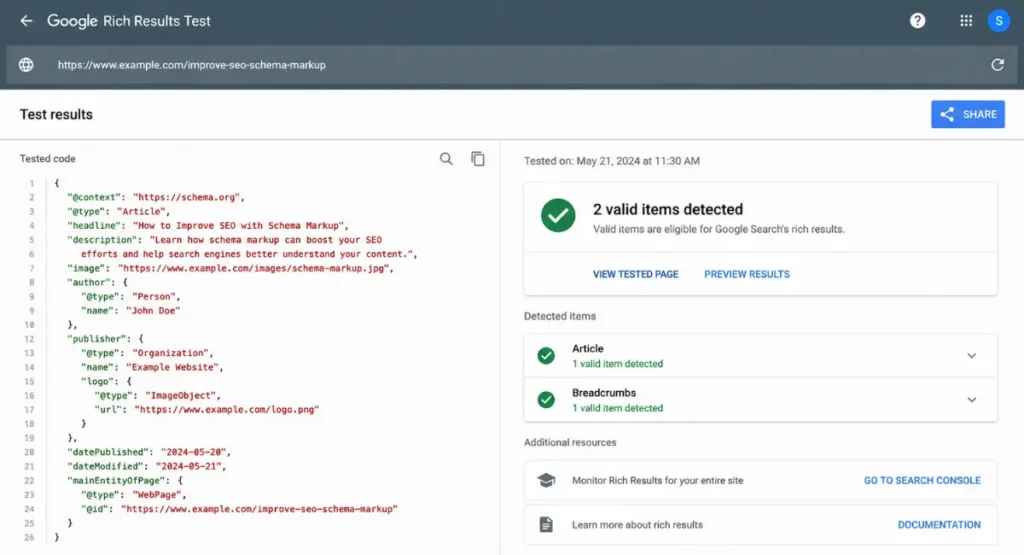
Generating schema and validating it are two different steps, and mixing them up is a common source of confusion. Validating checks whether your code is syntactically correct and matches Schema.org’s vocabulary. Testing for rich results checks whether Google specifically will treat the page as eligible for a rich result, which involves additional Google-specific requirements beyond basic validity.
Using Google’s Rich Results Test
Google’s Rich Results Test checks a live URL or a code snippet against Google’s own rich result requirements, not just general Schema.org rules. It will tell you whether a page is eligible for specific rich result types and flag any missing required fields.
Using Schema.org Validator
The Schema.org Validator, available at validator.schema.org, checks your code against the official Schema.org vocabulary rather than Google-specific rich result rules. It’s useful for confirming your JSON-LD syntax is valid even if you’re not targeting a Google rich result specifically.